
API and integrations
Connect SentrixFM to the systems you already run
A documented REST API, signed webhooks that push events to your systems, and an inbound endpoint that accepts events from them. Every call respects the permissions of the user behind it.
REST API
A documented API across the whole platform
- Work orders, PPM, assets, locations and maintenance requests
- Workflows, documents, contracts and IoT readings
- Dashboards and the SentrixFM AI Assistant
- Full API reference provided during onboarding
Security
Every call runs with the user's own permissions
- Secure token sign-in
- The user's own permissions and location access on every call
- Each company's data in its own isolated space
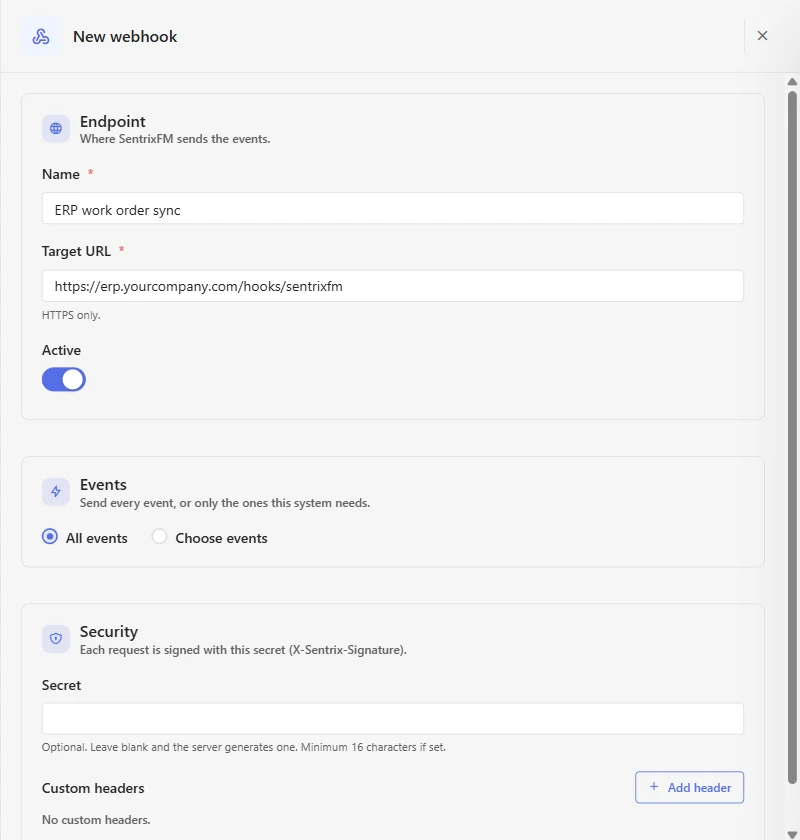
Outbound webhooks
Push events to your systems as they happen
- Work order status changes, PPM executions and inspection reviews
- Asset changes and consumable requisitions
- Signed with HMAC-SHA256, with automatic retries
- Delivery log and a test ping
Inbound endpoint
Receive events from your other systems
- One inbound endpoint per company
- JSON events, accepted with a token
- ERP and finance, BMS and IoT platforms, HR systems and BI tools
Frequently asked questions
Does SentrixFM have an API?
Yes. A documented REST API covers work orders, PPM, assets, locations, Workflows, maintenance requests, documents, contracts, IoT readings, dashboards and the SentrixFM AI Assistant. The full API reference is provided to every customer during onboarding.
Can SentrixFM notify our other systems when something changes?
Yes. You choose an HTTPS address and SentrixFM sends signed webhooks for work order status changes, PPM executions, inspection reviews, asset changes and consumable requisitions. Failed deliveries are retried automatically, and a delivery log and a test ping are included.
How are integrations secured?
Integrations sign in with a secure token. Every API call runs with the permissions and location access of the user behind it, webhooks are signed with HMAC-SHA256, and each company's data stays in its own isolated space.
Which systems do customers connect?
Typically ERP and finance systems, BMS and IoT platforms, HR systems and BI tools. Each company also has an inbound endpoint that accepts JSON events with a token.
Who can set up integrations?
Integrations are switched on per company and governed by the View Integration and Manage Integration permissions, so the company decides who sees and manages them.
Related guide: What is a CAFM system?
See the API and webhooks in SentrixFM
We walk you through it live, with your systems in mind.