
Workflows
Draw your maintenance strategy once. SentrixFM runs it.
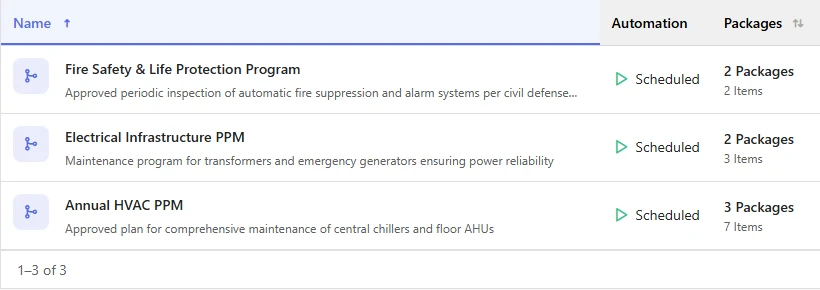
A visual BPMN editor is built into SentrixFM. Draw the Maintenance Packages and their PPM tasks, choose whether packages run in parallel, in sequence or by priority, and the workflow runs on its schedule: every due task becomes a work order, with no schedules typed in one by one.
Visual editor
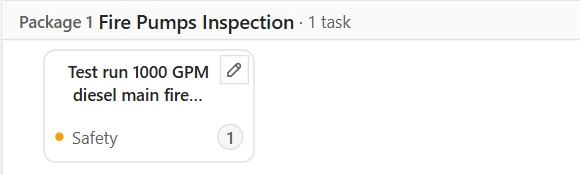
Draw the plan instead of filling in forms
- Swimlanes are Maintenance Packages
- The draggable shape is the PPM task
- Tasks sit inside a package lane and connections run from task to task
Execution
Choose how the packages of a workflow run
- Parallel
- Sequential
- Priority-optimized

Schedule
Run on a date or a cron schedule, and pause when you need to
- Scheduled by date or by cron expression
- Pause, resume and duplicate a workflow
- Planned package days skip company weekends and holidays

Progress
See how far each package has come
- Progress is completed working items over the total
- Shown per package, inside the workflow plan
- Timeline built from audit-log entries

From plan to work order
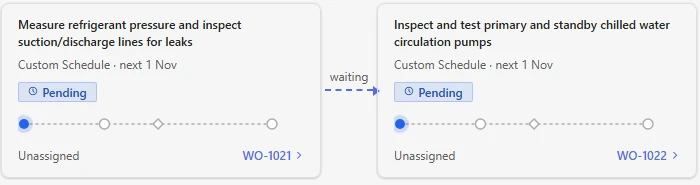
Due tasks become work orders on their own
- Created automatically on the due date
- SOPs carry through, and if copying a SOP fails the work order is not created
- Source shows Workflow Related
How it connects
Workflows are where the plan-to-proof chain begins
You draw the plan once. From there the work arrives as work orders automatically, execution follows the SOP, and the proof stays on the record that your reports read from.
- 1
Workflow and PPM
Plan the work and its schedule in advance.
- 2
Work order
Created on the due date with its data.
- 3
SOP and proof
Steps, photos and time recorded on the job.
- 4
Reports
Quality check, client approval and reporting follow.
Frequently asked questions
Is the workflow editor really BPMN?
Yes. Workflows are drawn in a visual BPMN editor built into SentrixFM. Swimlanes are Maintenance Packages, and the shape you drag in is a PPM task.
How does a workflow start?
By schedule, either by date or by cron expression. When a task falls due, it becomes a work order automatically.
In what order do the packages run?
That depends on the execution strategy of the workflow: parallel, sequential or priority-optimized.
Can I pause a workflow or copy it?
Yes. A workflow can be paused and resumed, and it can be duplicated to start a similar plan.
Related guide: The Work-Order Lifecycle Explained: Statuses and Proof
See a workflow drawn and scheduled
We walk you through it live, on one of your own sites.