
Standard operating procedures
Build the procedure once and follow it on every job
An SOP is a form made of sections and fields. Your team follows it on the work order, and the answers, photos and signatures stay with the job.
Structure
Sections inside sections
- Nested sections up to 5 levels deep, up to 5 subsections per section
- Automatic hierarchical numbering (1, 1.1, 1.1.1)
- Collapsible sections keep long checklists scannable
Fields & rules
Nine field types, with rules
- Nine field types including photo capture and signature pad
- Answers that break a rule are saved, keeping the SOP incomplete
- Required photo, file and checkbox fields block work order completion when the SOP gate is on
Logic
Fields that react to answers
- Show or hide fields based on other fields’ answers
- Eight operators: equals, not equals, greater than, less than, is empty, is not empty, contains, starts with
- A required field hidden by its condition does not block completion
Templates
One template, every job
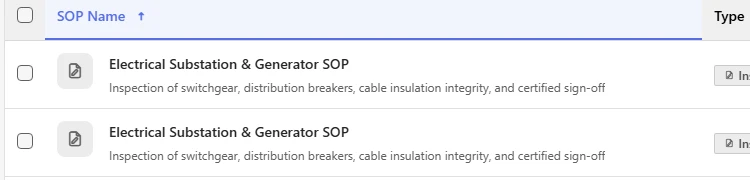
- Company template library with categories and duplication
- A work order can carry several SOPs, locked once completed or cancelled
- If SOP copying fails during PPM generation, the work order is not created
Hierarchy
How nested sections are numbered
Example
- 1Chiller safety & isolation check
- 1.1Electrical lockout verification
- 1.1.1Breaker tag & voltage reading
- 1.2Pressure & flow baseline
- 2Sign-off & evidence
Plan to proof
Where SOPs sit in the maintenance chain
From the PPM schedule or workflow task, the SOP travels into the work order and holds the evidence needed for quality check and sign-off.
- 1
PPM & Workflow
Attach an SOP template from the company library.
- 2
Work Order
Each job receives its own fresh copy with empty answers.
- 3
SOP Execution
Teams fill nested sections, photos and signatures; gates block premature completion.
- 4
Proof & Sign-off
Completed answers lock with the job for audit and quality review.
Frequently asked questions
How deep can SOP sections be nested?
Sections can nest inside other sections up to 5 levels deep, with up to 5 subsections under any section. The viewer numbers them hierarchically (1, 1.1, 1.1.1) and lets you collapse each section.
What happens if I edit an SOP template after work orders are created?
Each work order gets its own deep copy with empty answers and new IDs when it is created. Later edits to the library template do not change copies on existing work orders.
Can conditional fields enforce completion gates?
Conditions show or hide fields in the form (web form and phone). The server completion check enforces each field’s Required setting, but skips a required field that its condition hides, so a hidden field never blocks completion.
See SOPs in action on a live work order
Book a demo to see nested sections, field rules and completion gates running on your own maintenance scenarios.