
Assets and locations
Every asset has a place, a state and a QR code
Seven location levels, four asset states, a QR code on each asset, space records with area, capacity and occupancy per location, and access limited to the locations a user is assigned to. One register for the whole estate.
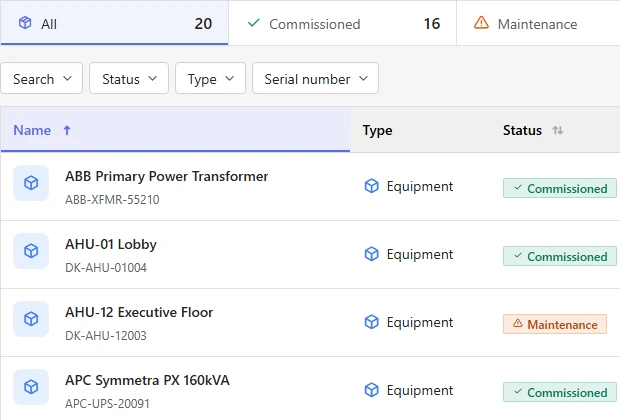
Asset register
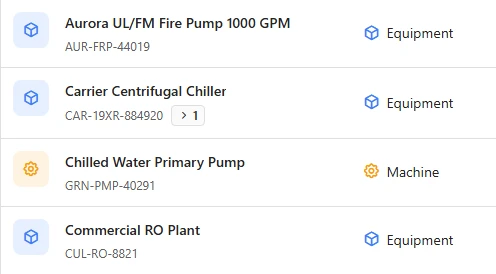
Seven asset types, with sub-assets under a parent asset
- Seven asset types
- Sub-assets under a parent asset
- Type and status of each asset in one register
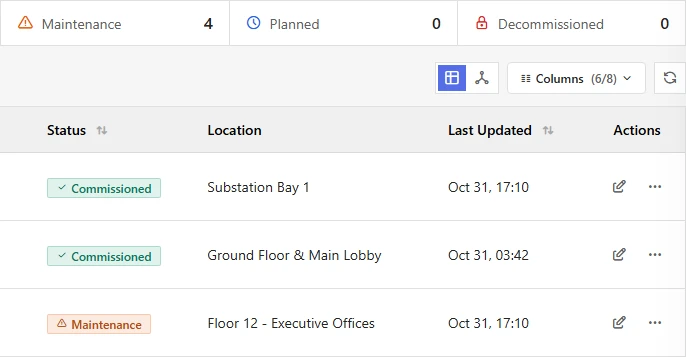
Asset states
Four asset states, with rules for maintenance
- Planned, Commissioned, Maintenance, Decommissioned
- No work orders or PPMs on planned or decommissioned assets
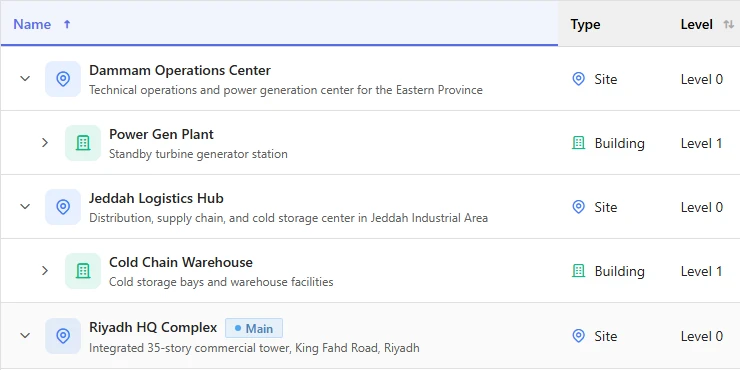
Locations
Seven location levels, and people see only their own
- Levels 0 to 6, with the limit enforced
- Level names are guidance, not a fixed list
- Users see only the locations assigned to them
QR code and cost
A QR code and the lifetime cost, on the asset itself
- A QR code for each asset
- A cost tab with the lifetime cost of the asset
- Cost is visible only with the View Cost permission
Frequently asked questions
How many levels can the location structure have?
Seven, numbered 0 to 6, and the limit is enforced. The names of the levels are guidance, so you can name them the way your sites are organised.
Which states can an asset be in?
Planned, Commissioned, Maintenance or Decommissioned. Planned and decommissioned assets get no work orders and no PPMs.
Does every work order need an asset?
Starting a work order needs an assignee and, for hard services, an asset.
Who sees which locations?
Users see only the locations assigned to them.
Who can see the cost of an asset?
Each asset has a cost tab with its lifetime cost. Only roles with the View Cost permission see cost; technicians do not.
Related guide: What is a CAFM system?
See your sites and assets in SentrixFM
We walk you through it live, on one of your own sites.