
What is a work order?
A work order is a written instruction to carry out a specific maintenance job. It states what must be done, on which asset, at which location, by whom and by when. It usually starts from a maintenance request or a preventive maintenance schedule. It moves through several statuses until it closes, and it carries the record that proves the work was actually done.
What separates a work order from a phone message is accountability. A work order has a named owner, a due date and a known status. Once closed, it remains evidence you can return to in a dispute, an audit or a review of how an asset is performing.
A good work order usually holds the following:
- Description: exactly what is needed, in words the technician understands.
- Location and asset: the building, floor and room, plus the asset involved, if any.
- Assignee: a named technician or team.
- Priority and due date: what comes first, and by when.
- Instructions: a task list or SOP.
- Proof: what must be recorded before closing.
What are the work-order statuses?
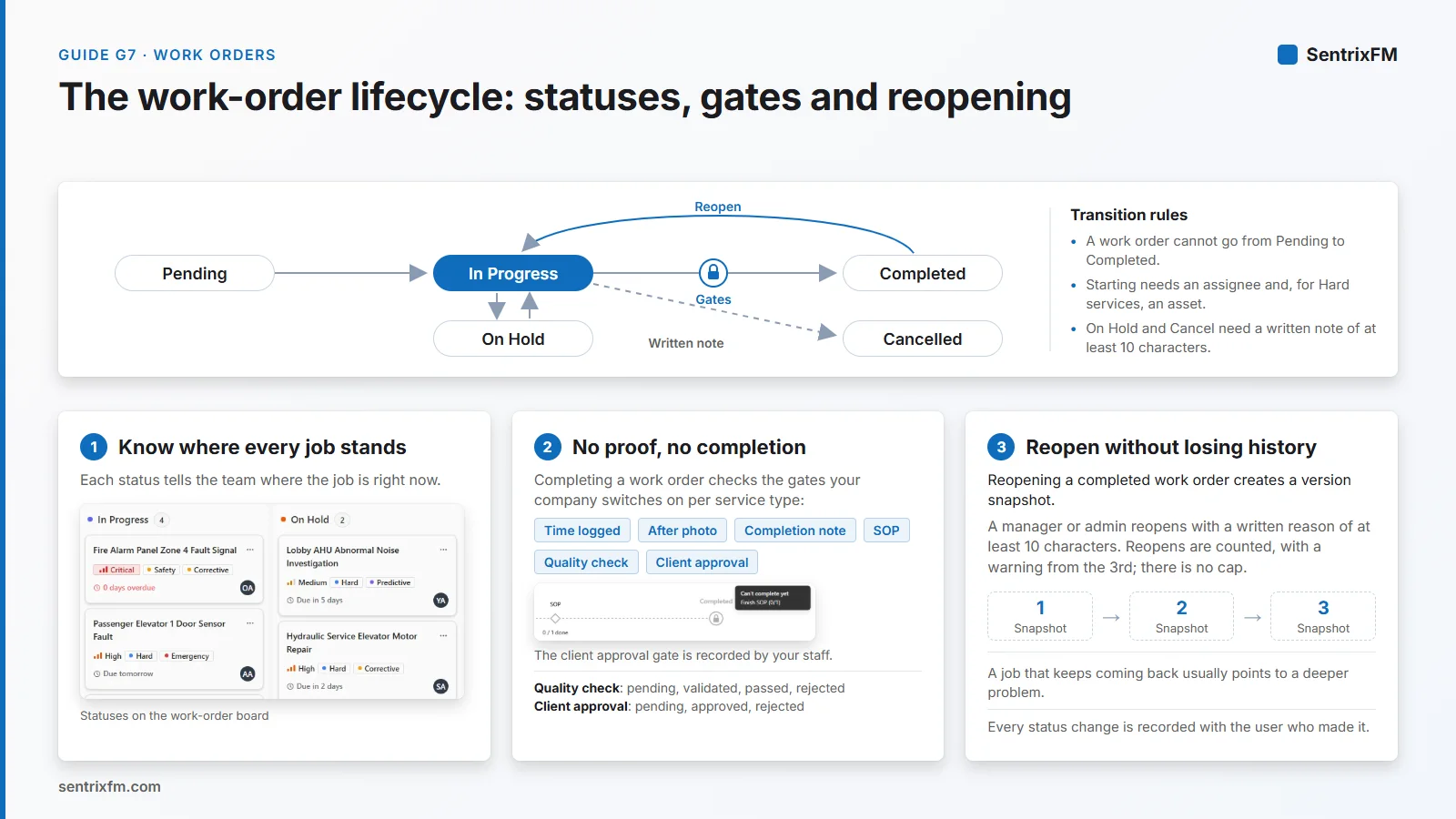
Status names vary between systems, but the idea is the same: each status tells you where the job stands right now. In SentrixFM the work order statuses are Pending, In Progress, On Hold, Completed and Cancelled. Moving between statuses is not free. Each step has conditions: a job cannot go straight from Pending to Completed, and cannot be put On Hold without a written note.
| Status | What it means in the lifecycle |
|---|---|
| Pending | The order exists, but work has not started |
| In Progress | The assignee has started the work |
| On Hold | Work is paused for a reason, such as waiting for a part or no site access |
| Completed | The work is finished and has met the closing conditions |
| Cancelled | The work is no longer needed |
Transition rules in SentrixFM:
- A work order cannot go from Pending to Completed. Starting needs an assignee and, for Hard services, an asset.
- On Hold and Cancel need a written note of at least 10 characters.
These rules have a practical effect. A job cannot jump straight from Pending to Completed. And an order cannot be cancelled without a written note.
Why should a work order never close without proof?
A work order closed in one click with no evidence proves nothing to an auditor or a client. That is why organised teams require proof before closing, such as time logged, an after photo and a completion note.
The gates in SentrixFM: completing a work order checks the gates your company switches on per service type: time logged, after photo, completion note, SOP, quality check, client approval.
- Time and photo: time logged on the work order counts toward the time gate, and a photo uploaded on its Documents tab counts as the after photo.
- Quality check and client approval: quality check states are pending, validated, passed and rejected. Client approval states are pending, approved and rejected.
- Who records approval: the client approval gate is recorded by your staff.
How do you decide which gates to switch on? Ask what a client or auditor would ask for if they challenged this job. Safety and critical-system work deserves more proof than routine tasks. If you force every gate onto every job, closing becomes a chore, and the team will start to put it off.
What is the difference between a maintenance request and a work order?
A maintenance request is a report from a building user that something is wrong, such as a leak or an air conditioner that is not cooling. A work order is the formal instruction to act once the report has been reviewed. Not every request deserves a work order: some are duplicates or out of scope. A good system therefore keeps the report separate from the assignment and reviews the request first.
This separation protects the team from two problems: every message turning into a job, and a real report getting lost among the messages.
In SentrixFM: maintenance requests can be submitted in the app or through a public form, and each request is approved or rejected. "Approve requests, then link them to work orders"
The result is a clear path from the first complaint to closure:
- A building user submits the request.
- The team reviews the request and approves or rejects it.
- The approved request is linked to a work order.
- The work order moves through its statuses until it is completed with the required proof.
When should a work order be reopened?
Reopen a work order when it turns out, after closing, that the job was not finished or the problem has come back. The best practice is to keep the earlier record intact rather than overwrite it. In SentrixFM, reopening a completed work order creates a version snapshot. A work order can be reopened at most 3 times, and an admin or manager can override this limit.
Why a cap? An order that keeps being reopened usually points to a deeper problem than the job itself. It may be a wrong diagnosis, an unsuitable part, or an asset that needs a replacement decision. The snapshots keep each earlier closure on record.
What are the common work-order mistakes?
Each of these mistakes weakens trust in the data. Your reports end up describing what was typed in, not what actually happened.
- No owner: the order sits in Pending because nobody knows it is theirs.
- Closing without evidence: no photo, no time, no note, so there is nothing to show the client.
- "On Hold" with no reason: held work piles up and nobody knows what it is waiting for.
- Cancelling to tidy up: old orders are cancelled to shorten the list, and the trail of the problem is lost.
- Accepting every report: duplicate orders pile up for the same fault.
- Reopening without history: the previous closure is overwritten, so nobody can see what changed.
- The same gates for every job: too strict on routine work, too loose on critical work.
What SentrixFM does for the work-order lifecycle
- Statuses: Pending, In Progress, On Hold, Completed, Cancelled.
- Transition rules: a work order cannot go from Pending to Completed. Starting needs an assignee and, for Hard services, an asset. On Hold and Cancel need a written note of at least 10 characters.
- Gates: completing a work order checks the gates your company switches on per service type: time logged, after photo, completion note, SOP, quality check, client approval. Time logged on the work order counts toward the time gate, and a photo uploaded on its Documents tab counts as the after photo.
- Quality and approval: quality check states are pending, validated, passed and rejected; client approval states are pending, approved and rejected. The client approval gate is recorded by your staff.
- Requests: submit in the app or through a public form; approve or reject. "Approve requests, then link them to work orders"
- Reopening: reopening a completed work order creates a version snapshot, with a maximum of 3 reopenings; an admin or manager can override.
Next step: a live demo on one of your sites. Contact contact@sentrixfm.com or visit sentrixfm.com.