
Why educational buildings are different
An educational building receives hundreds or thousands of people every day, and any fault shows up at once in front of students, teachers and parents. In general, facility managers in this sector run into three recurring problems, with different weight from one institution to another:
- A large preventive maintenance load: air conditioning, lighting, plumbing, lifts and laboratories spread across many buildings, with technicians able to work freely mainly when the rooms are empty.
- Routine inspections that must be proven: firefighting equipment, emergency exits, laboratories and canteens need regular checks, and it matters that evidence remains that they were done. Official requirements differ from country to country, so always check what applies to your own authority.
- A scattered campus and mixed teams: many buildings, and technicians and contractors who may not share one language, so a work order gets lost between translation and scattered messages.
When these are run on a spreadsheet and chat threads, maintenance hangs on the memory of one or two people, and the problem shows at the first absence or the first major fault.
Preventive maintenance for buildings and classrooms
Planned preventive maintenance (PPM) means inspections, cleaning, lubrication and part replacements carried out on set dates before the asset fails. In schools and universities you can start like this:
- Register the assets first: classroom air conditioning, electrical panels, lifts, pumps, generators, laboratory and kitchen equipment, and firefighting equipment.
- Set the frequency from the manufacturer's guidance and your team's experience, not from guesswork. Some tasks are monthly, others quarterly or yearly.
- Name an owner for every task. A task without a name usually does not get done.
- Spread the load: do not put all the big tasks in one week, and keep jobs that need an empty building for the times when the building is really empty.
- Review the plan regularly: overdue tasks, and the assets that fail more than others, then adjust.
Preventive maintenance does not remove breakdowns, but it cuts surprises and moves part of the work from emergencies to a schedule known in advance.
Schedules that respect company holidays
A maintenance schedule that does not know the closure days creates tasks nobody can carry out; they pile up and then get ignored. Ask any supplier four things:
- Does the schedule respect the time zone and the days off where you are?
- What happens to a task that falls on a holiday: is it moved to the next working day or skipped? And who decides?
- Are safety tasks treated differently? A safety check should not be allowed to disappear.
- If the previous work order is still open, does a new one from the same cycle pile on top of it?
Mind the limits of a holiday list: it belongs to the company. If your institution has teaching and exam periods that affect when technicians can enter buildings, account for them in your own planning and do not assume the system knows them.
Routine inspections and SOP checklists with photos
A routine inspection is not a repair: it is a regular walk-through of a list of items, and what it must produce is evidence, not only work. A standard operating procedure (SOP) checklist is the form the technician fills in step by step. A good one has:
- Field types that suit each item: a checkbox for what is confirmed, a number for a reading, a dropdown for a condition, a photo to prove the state, a signature for the supervisor.
- Required fields that cannot be skipped, so the job cannot be closed while they are empty.
- Photos: a picture of the fire extinguisher or the emergency exit is more convincing than the word "done".
When an inspection fails, for example an emergency door that does not open easily, recording the failure is not enough. A clear, written decision is needed: a repair work order, or a skip with the reason stated, so that the item is not left hanging with no owner.
Location structure from campus to room
An example of a workable structure: campus, then building, then floor, then wing, then room. The finer the structure, the sharper the report: "laboratory 204 air conditioning in building B" is far better than "the air conditioning is not cooling". The structure helps you in three ways:
- Each asset is tied to its real place, so the technician knows where to go.
- Responsibility is divided: each supervisor or team follows their own building and does not see the others.
- Reports can be grouped by building or floor when needed.
Technicians, checklists, and Arabic and English
A technician works between buildings, not behind a desk, so they need to see the day's tasks, open the checklist, attach photos and record the work as they go. Language is a practical matter: in many facility teams in the Gulf, some people read Arabic and others read English. Check three things:
- That right-to-left layout is supported in screens and reports, not only in menus.
- That each technician sees the locations assigned to them, so they are not distracted by buildings that are not their responsibility.
- That a real technician tries a full working day in the demo, from receiving the task to closing it.
Where to start
- Start with one campus or one building, not all buildings at once.
- Register first the assets whose failure stops teaching or puts people at risk.
- Turn the most important paper inspections into checklists with required fields and photos.
- Add the remaining buildings once the team is used to the cycle.
How SentrixFM handles this
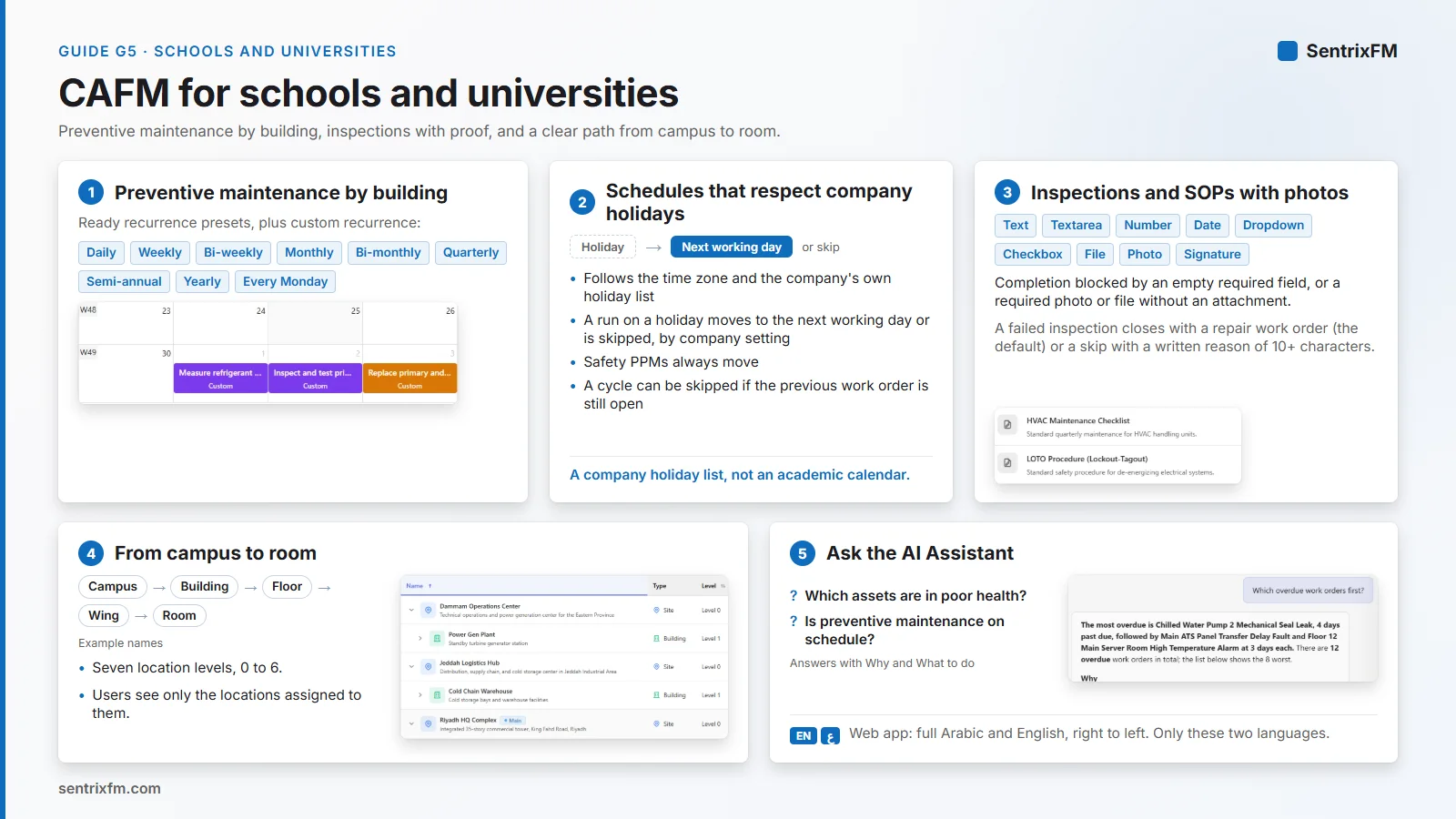
- Preventive maintenance: ready recurrence presets are daily, weekly, bi-weekly, monthly, bi-monthly, quarterly, semi-annual, yearly and every Monday, plus custom recurrence.
- Holidays: scheduling follows the time zone and the company's own holiday list; a run on a holiday moves to the next working day or is skipped, depending on the company setting, safety PPMs always move, and a cycle can be skipped if the previous work order is still open. This is the company holiday list, not a calendar of teaching periods.
- Checklists: nine SOP field types: text, textarea, number, date, dropdown, checkbox, file, photo and signature. Completion is blocked by an unticked required checkbox, a required photo or file without an attachment, or an empty required text field.
- Failed inspections: close with a repair work order (the default) or a skip with a written reason of 10 or more characters.
- Locations: seven levels, 0 to 6; users see only the locations assigned to them.
- Language: the web app is fully Arabic and English with right-to-left layout, and only those two languages.