
What is planned preventive maintenance (PPM)?
PPM stands for Planned Preventive Maintenance: inspections, cleaning, lubrication and part replacements carried out on dates set in advance, before the asset fails. The dates come from the manufacturer's guidance, regulatory requirements and your team's experience. It is planned because every task has a date and an owner, and preventive because the aim is to stop the failure, not repair it.
Why it matters for facility teams
- Continuity: an asset serviced on time is less likely to stop at the worst moment, such as a hot summer day.
- A clearer budget: planned work can be forecast for time, labour and parts, unlike emergencies.
- Safety and compliance: many systems, such as fire protection and lifts, require documented periodic checks; the exact requirements differ by country and authority, so confirm them with your local codes.
- Proof: a record of completed work protects you in a dispute or an audit.
Preventive vs corrective vs predictive
- Corrective: fixes a fault after it happens. Unavoidable, but relying on it alone means always working under pressure.
- Planned preventive: work done on a time or usage cycle, whatever the asset's condition at the visit.
- Predictive: work triggered by measured condition, such as vibration or temperature, which needs sensors and data; definitions of predictive maintenance vary between sources.
How to build a PPM plan, step by step
1. Build the asset register. You cannot schedule what you do not know. Record each asset's name, type, location, status and installation date, starting with critical ones: HVAC, electrical, pumps, lifts, fire systems.
2. Set the goal per asset. Safety, service continuity or warranty? The goal sets how deep and how often.
3. Set the frequency. Start with the manufacturer's manual, then statutory requirements, then operating conditions: a dusty or humid site needs more cleaning. Do not copy one schedule across every building.
4. Write the task list and SOP. Each job needs clear steps: what to check, with what tool, what value is acceptable and what to record. A written list gives the same result whoever does the job.
5. Prepare parts and consumables. Filters, belts and oils must be on the shelf before the due date.
6. Assign owners. Every job needs a person or team, a due date and a priority. A work order without an owner does not get done.
7. Schedule against the real calendar. Respect your own weekend, public holidays and seasonal peaks, and spread the load: do not put a whole month of work into one week.
8. Require proof at completion. An after photo, readings, a note and a signature where needed. Work with no evidence counts as not done in an audit.
9. Review regularly. Every quarter or half-year, compare planned against completed, find assets that keep failing, and adjust frequencies and tasks.
How to choose the frequency
- Start from the manufacturer's recommendation, then adjust with experience. Some manufacturers set intervals by running hours rather than by calendar.
- Inspect critical and safety-related assets more often.
- Do not set a frequency your team cannot deliver.
- An asset that fails between visits needs a shorter interval.
Common mistakes
- No asset register: work lands on unknown or duplicated assets.
- Copying a ready-made schedule: your building is not someone else's.
- No task list: each technician works their own way and results cannot be compared.
- Ignoring holidays: due dates fall on days off and a backlog builds.
- Closing jobs without proof: no photo, no note, no reading.
- Stacking orders: a new order issued on top of one never finished.
- Never reviewing: the plan stays as first written for years.
A simple checklist
- Asset register complete, with location and status
- Each critical asset has a goal and a frequency from a written source
- Each job has a task list or SOP
- Parts available before the due date
- Each job has an owner and a due date
- Holidays and the weekend are in the schedule
- Required proof at closure is defined
- A review date is set
Doing it in SentrixFM
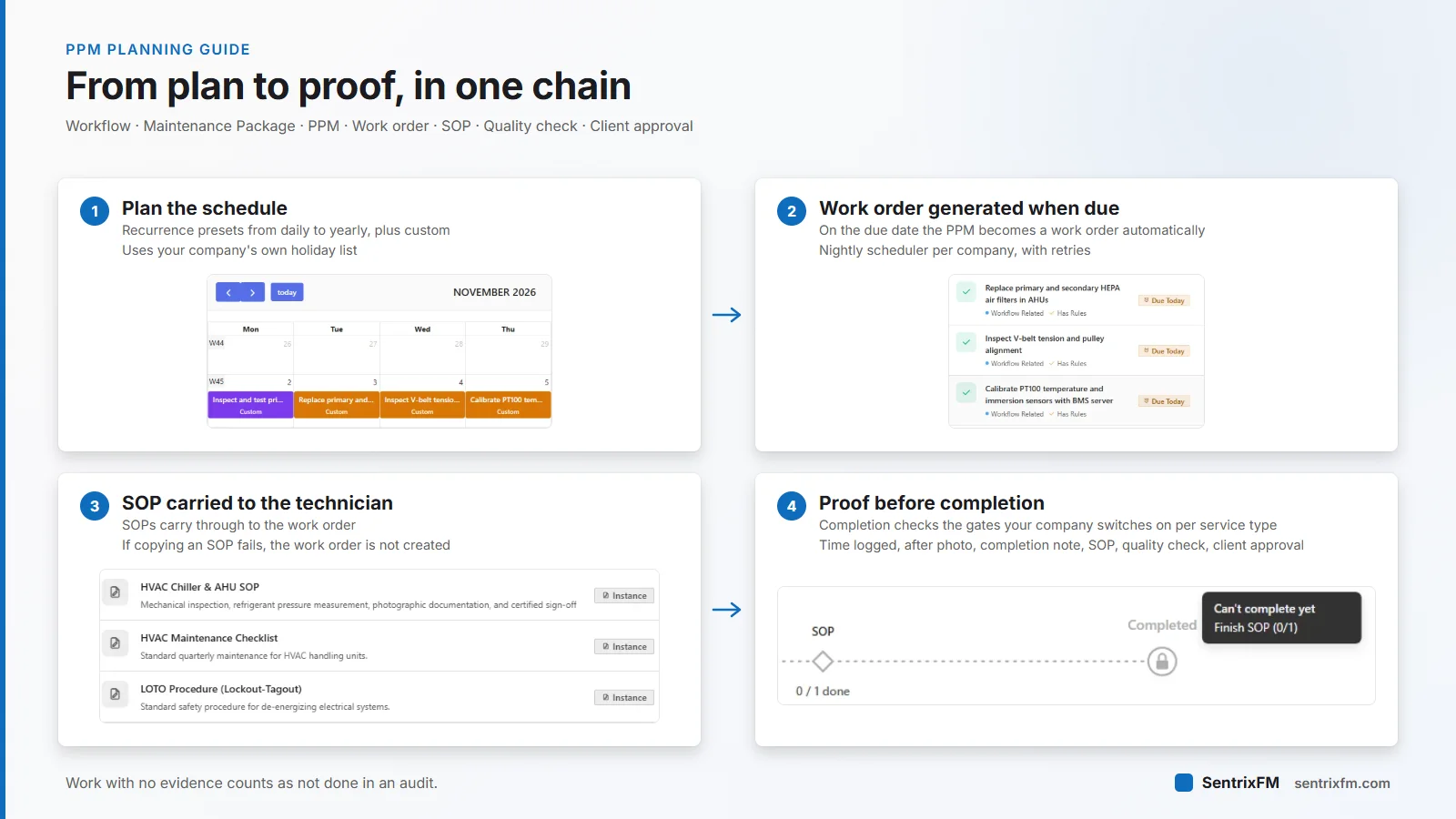
SentrixFM links the plan to the execution in one chain: Workflow, MaintenancePackage, PPM, work order, SOP, quality check, client approval.
- Workflow: drawn in a visual BPMN editor; swimlanes are MaintenancePackages, and the tasks inside are PPM items (WorkingItems).
- Recurrence: presets are daily, weekly, bi-weekly, monthly, bi-monthly, quarterly, semi-annual, yearly, every Monday, and custom. Custom covers every N days, chosen weekdays, chosen month dates, the Nth weekday of a month, or a raw cron expression.
- Automatic generation: a nightly scheduler per company, with retries and a recovery run; a manual convert to work order also exists.
- Holidays and time zone: timezone-aware, using your company's own holiday list. By company setting, a run on a holiday moves to the next working day or is skipped (safety PPMs always move), and a cycle can be skipped if the previous work order is still open. Planned package days skip company weekends and holidays.
- From schedule to work order: on the due date the PPM becomes a work order automatically with its name, priority, due date, category, service type, location, assets, assignees and attachments.
- Task lists: SOPs carry through to the work order; if copying an SOP fails, the work order is not created. Nine SOP field types: text, textarea, number, date, dropdown, checkbox, file, photo, signature. Completion is blocked by an unticked required checkbox, a required photo or file with no attachment, or an empty required text.
- Proof: completing a work order checks the gates your company switches on per service type: time logged, after photo, completion note, SOP, quality check and client approval.
- Asset limits: no work orders or PPMs are created on planned or decommissioned assets.
Next step: book a live demo on one of your sites at contact@sentrixfm.com or sentrixfm.com.