
One view across dozens of sites
A bank branch is not an isolated building but part of a network: branches that look alike, larger office buildings, and shared systems such as cooling, power, alarms and security. When these sites are managed through scattered files or messages between regions, the same problems repeat:
- Nobody sees the whole network, so the monthly report is assembled by hand from each region.
- It is hard to tell quickly which branch has overdue work and which is stable.
- The technician arrives with incomplete information about the asset to be serviced.
- Sites and assets are named differently from region to region, so the numbers cannot be compared.
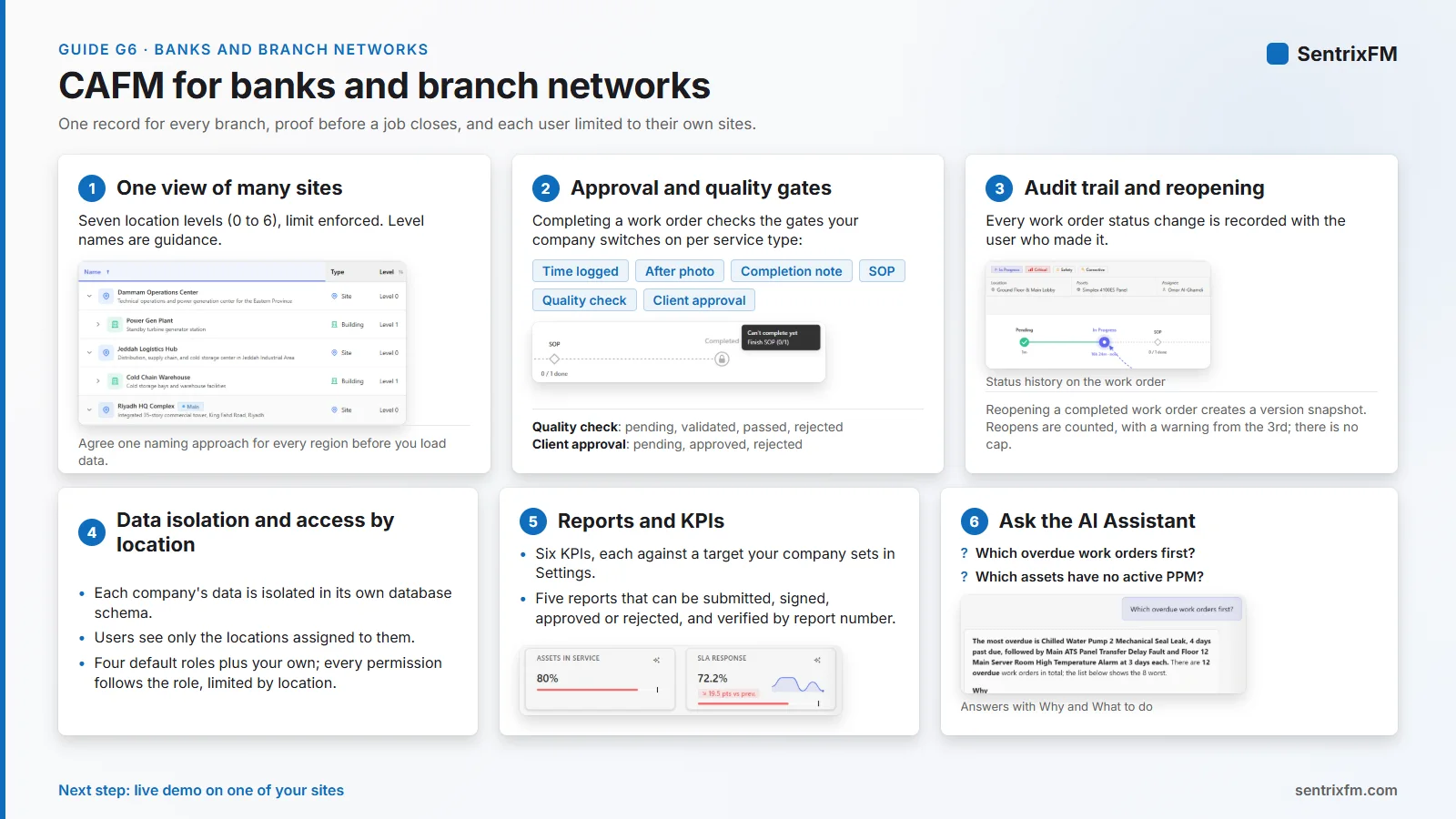
What you need is one record with an agreed structure. In SentrixFM locations are organised in seven levels (0 to 6) and the limit is enforced, but the level names are guidance, not a fixed rule: your institution can map them to its own structure, for example region, then branch, then building, then floor. What matters more is agreeing one naming approach for every region before you load data, because the system shows what you enter and does not repair an inconsistent structure.
Approval and quality gates
When work is carried out by a contractor or an outside maintenance team, facility management keeps asking one simple question: how do we know the work was really done before its order is closed? The usual practice is that closing should not rest on the contractor's word alone but on proof gathered at the time of the work. When a work order is completed in SentrixFM, the system checks the gates your company switches on per service type:
- Logged work time.
- An after photo.
- A completion note.
- The standard operating procedure (SOP).
- A quality check.
- Client approval.
Not every gate suits every service: servicing a generator is not the same as replacing a light in a corridor, so choose the gates per service type according to its risk. The quality check has four states: pending, validated, passed, rejected. Client approval has three: pending, approved, rejected.
In a bank the reader may ask who the "client" is here. Your institution decides: the branch manager, for example, or the department that requested the service. It is better to settle that party and how its decision is recorded before go-live, not after.
Audit trail and reopening a work order
When completed work is reviewed, a reviewer cares about two questions: what happened to the work order over time, and who changed its status? In SentrixFM every change in a work order's status is recorded with the user who made it, and it appears in the status history on the work order itself. We keep the description precise: it is a history of statuses that shows who moved the order from one state to another, and we do not claim it covers everything that happens in the system.
A completed order may be reopened when it turns out the work was not done properly. Reopening creates a saved version of the order, is limited to three times, and an admin or manager can override that limit. It helps to set an internal rule: who may decide to reopen, and what counts as an acceptable reason, so that reopening does not become a substitute for raising a new order.
Data isolation and location-based access
Ask any vendor about two layers of isolation, one at a time:
- Between institutions, at platform level: is your data separated from other companies' data in the database itself, or only in the interface?
- Inside your institution: who sees which location and which record? This is where roles and location-based access come in.
In SentrixFM each company's data is isolated in its own database schema, and users see only the locations assigned to them. There are four default roles (Company Owner, Facility Manager, Technician and User), your company can create its own, and every permission follows the role's permissions with access also limited by location. In practice a branch or regional lead sees what is assigned to them, and a central team sees a wider scope, depending on what you assign. This depends on setting up roles and locations with care, so it is part of running the system and not a step you do once and forget.
Reports and KPIs
Senior management is not satisfied to hear that maintenance is on track; it wants numbers compared with set targets. SentrixFM has six KPIs, each against a target your company sets in Settings (with a warning margin): SLA response, SLA resolution, PPM compliance, first-time fix, MTTR and assets in service. The targets themselves are set by you to match your policy, not imposed by the system.
Five reports are available: work-order summary, asset health, PPM compliance, the KPI scorecard against targets (with a six-period trend and a breakdown one level down), and work-order KPIs. Reports can be submitted, signed, approved or rejected, and any report can be verified by its report number, so what goes up to management is documented and its origin can be traced.
How SentrixFM handles this
Locations are organised in seven levels (0 to 6) and the limit is enforced; level names are guidance. Users see only the locations assigned to them. Completing a work order checks the gates your company switches on per service type: time logged, after photo, completion note, SOP, quality check and client approval. Quality check has four states (pending, validated, passed, rejected) and client approval has three (pending, approved, rejected). Every work order status change is recorded with the user who made it, in the status history on the work order. Reopening a completed work order creates a version snapshot, up to three times, and an admin or manager can override the limit. Each company's data is isolated in its own database schema, and there are four default roles plus custom roles your company creates, with every permission following the role's permissions and access also limited by location. There are six KPIs, each against a target the company sets in Settings, and five reports that can be submitted, signed, approved or rejected and verified by report number.
Next step: a live demo on one of your sites, through contact@sentrixfm.com or sentrixfm.com.